Examples Gallery
This page showcases complete examples from the mmgpy repository. Every snippet here uses the .mmg PyVista accessor; importing mmgpy registers the accessor plus the Medit reader/writer plugins.
3D Volume Meshing (mmg3d)
Mesh Quality Improvement
Improve mesh quality without changing topology.
"""Mesh quality improvement with mean edge length preservation."""
import pyvista as pv
import mmgpy  # noqa: F401

mesh = pv.read("input.mesh")

# Optimize quality only (no vertex insertion/removal)
optimized = mesh.mmg.remesh_optimize()

q_before = mesh.mmg.element_qualities()
q_after = optimized.mmg.element_qualities()
print(f"Mean quality: {q_before.mean():.3f} -> {q_after.mean():.3f}")
Open Boundary Remeshing
Remesh volumetric mesh with open boundaries.
"""Remeshing with open boundary handling."""
import pyvista as pv
import mmgpy  # noqa: F401

mesh = pv.read("domain_with_holes.mesh")

remeshed = mesh.mmg.remesh(
    hmax=0.1,
    hausd=0.001,
)
Lagrangian Motion
Remesh while applying mesh displacement.
"""Lagrangian mesh motion remeshing."""
import numpy as np
import pyvista as pv
import mmgpy  # noqa: F401

mesh = pv.read("input.mesh")
vertices = np.asarray(mesh.points)

displacement = np.zeros_like(vertices)
displacement[:, 0] = 0.1 * np.sin(vertices[:, 1] * np.pi)

moved = mesh.mmg.move(displacement, hmax=0.1)
Level-Set Discretization
Extract isosurface from implicit function.
"""Level-set based surface extraction."""
import numpy as np
import pyvista as pv
import mmgpy  # noqa: F401

mesh = pv.read("background.mesh")
vertices = np.asarray(mesh.points)

levelset = (
    np.linalg.norm(vertices - [0.5, 0.5, 0.5], axis=1) - 0.3
).reshape(-1, 1)

discretized = mesh.mmg.remesh_levelset(levelset)
2D Meshing (mmg2d)
Local Sizing Control
Apply regional mesh refinement via the local_sizing argument.
"""Per-region mesh density control."""
import pyvista as pv
import mmgpy  # noqa: F401

mesh = pv.read("domain_2d.mesh")

remeshed = mesh.mmg.remesh(
    hmax=0.1,
    local_sizing=[
        {
            "shape": "sphere",
            "center": (0.5, 0.5),
            "radius": 0.2,
            "size": 0.01,
        },
    ],
)
Solution-Based Adaptation
Adapt mesh to a solution field via a custom metric on point_data.
"""Mesh adaptation to solution gradients."""
import numpy as np
import pyvista as pv
import mmgpy  # noqa: F401
import mmgpy.metrics as metrics

mesh = pv.read("domain_2d.mesh")
vertices = np.asarray(mesh.points)

# Solution field
solution = np.sin(vertices[:, 0] * 4 * np.pi) * np.cos(vertices[:, 1] * 4 * np.pi)

# Simplified sizing: tighten where |solution| is large
sizes = 0.01 + 0.1 * np.abs(solution)
mesh.point_data["metric"] = metrics.create_isotropic_metric(sizes, dim=2)

remeshed = mesh.mmg.remesh()
Hessian-Based Adaptation
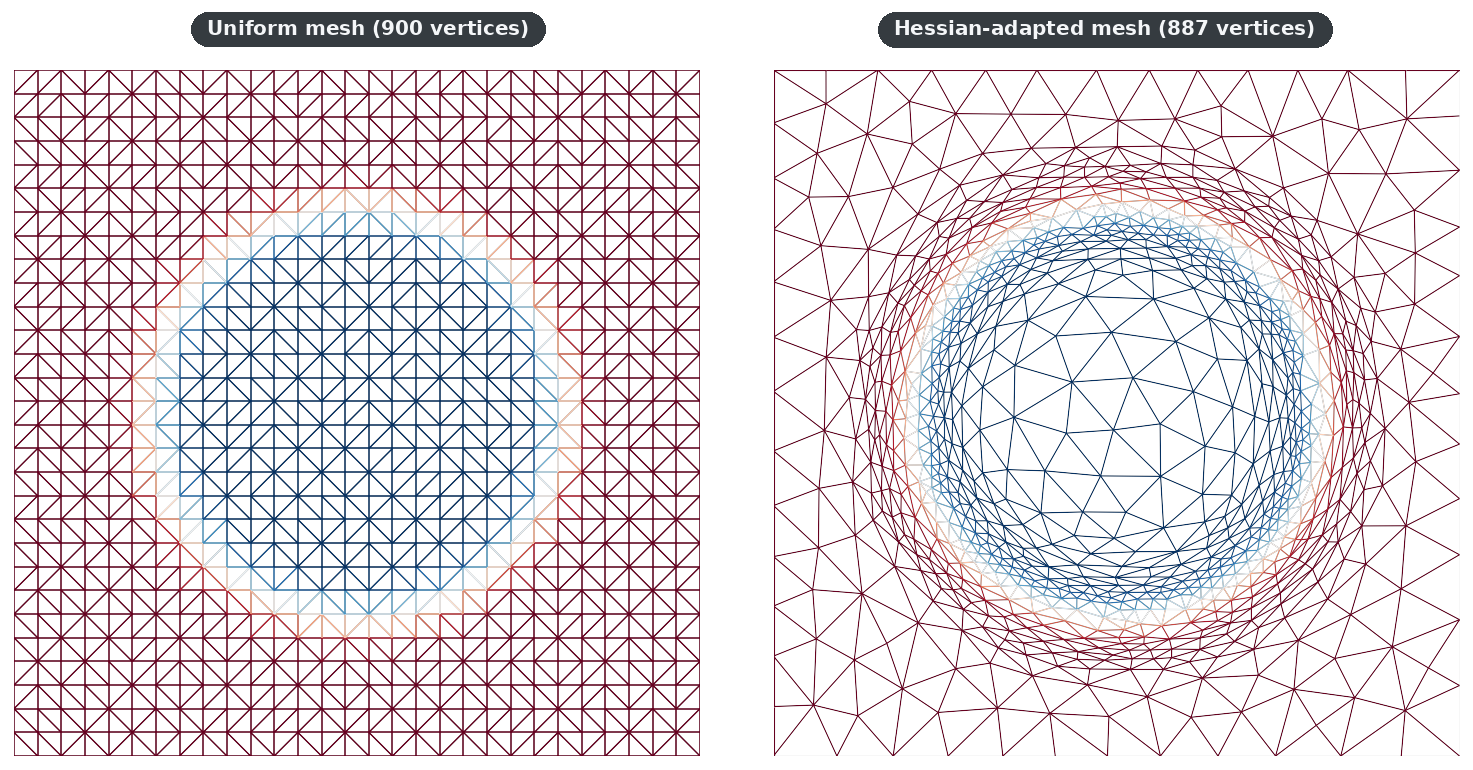
Solution-adaptive remeshing via patch-based Hessian recovery — same vertex budget, elements concentrate around fronts and stay coarse elsewhere. See the tutorial for a walkthrough.
from mmgpy.metrics import compute_hessian, create_metric_from_hessian

hessian = compute_hessian(vertices, triangles, field)
metric  = create_metric_from_hessian(hessian, target_error=5e-3, hmin=3e-3, hmax=8e-2)

mesh.point_data["metric"] = metric
adapted = mesh.mmg.remesh(hgrad=2.0)
Elasticity-Based Displacement Propagation
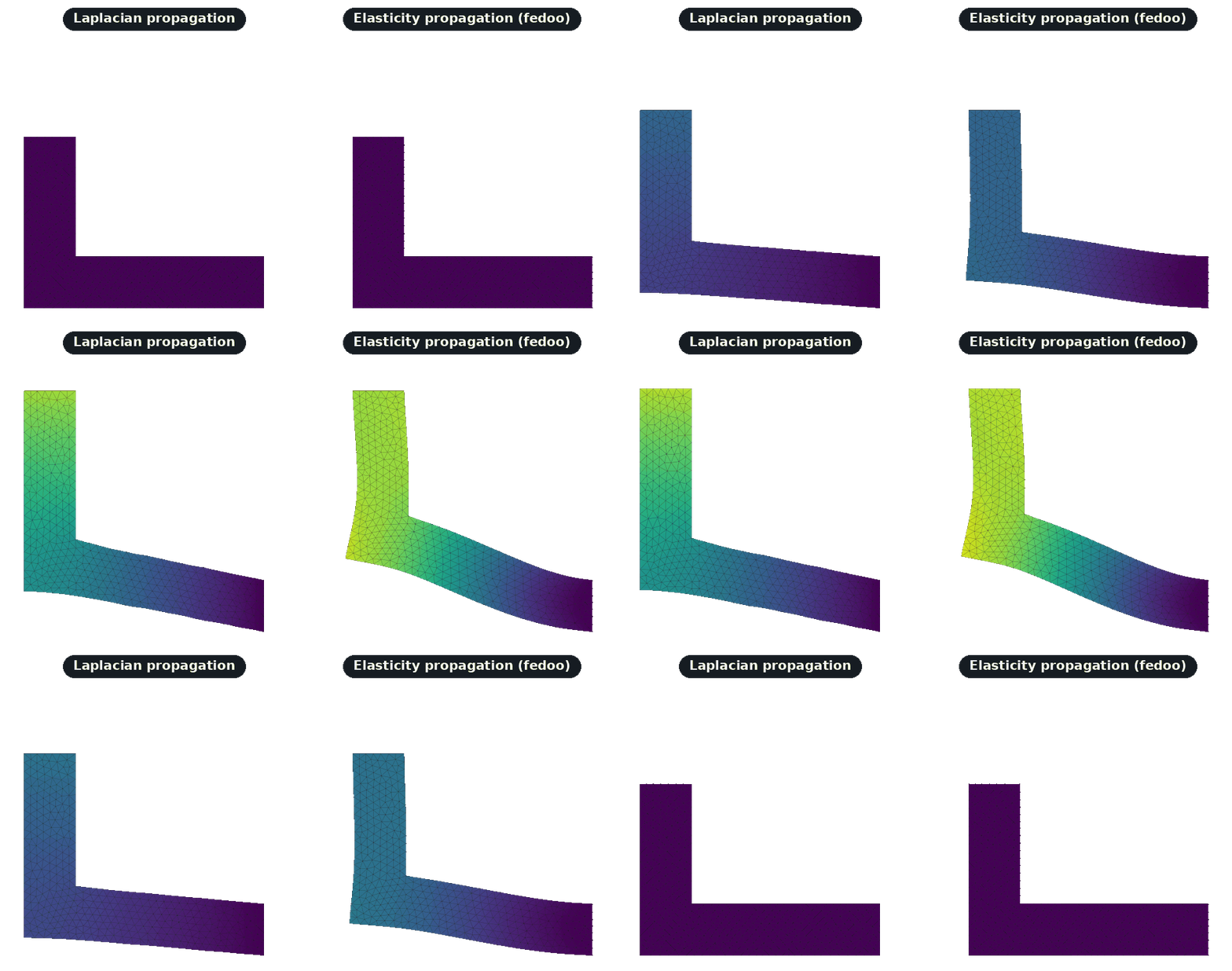
When a Laplacian smoother can't capture bending, the optional fedoo
backend solves a linear elasticity problem to propagate boundary
displacements through the mesh. See the
tutorial for a side-by-side
demo on an L-bracket cantilever.
from mmgpy.lagrangian import propagate_displacement_elasticity

field = propagate_displacement_elasticity(
    vertices, elements, boundary_mask, boundary_displacement,
    E=1e6, nu=0.3,
)
Anisotropic Mesh Adaptation
Directional mesh refinement.
"""Anisotropic mesh adaptation."""
import numpy as np
import pyvista as pv
import mmgpy  # noqa: F401
import mmgpy.metrics as metrics

mesh = pv.read("domain_2d.mesh")

# Create anisotropic metric (stretch in x direction)
sizes = np.array([0.1, 0.02])  # Larger in x, smaller in y
single_tensor = metrics.create_anisotropic_metric(sizes)
mesh.point_data["metric"] = np.tile(single_tensor, (mesh.n_points, 1))

remeshed = mesh.mmg.remesh()
Implicit 2D Domain Meshing
Generate mesh from implicit function.
"""Generate 2D mesh from implicit domain definition."""
import numpy as np
import pyvista as pv
import mmgpy  # noqa: F401

mesh = pv.read("background_2d.mesh")
vertices = np.asarray(mesh.points)

center = np.array([0.5, 0.5])
levelset = (np.linalg.norm(vertices[:, :2] - center, axis=1) - 0.3).reshape(-1, 1)

discretized = mesh.mmg.remesh_levelset(levelset)
Surface Meshing (mmgs)
Mechanical Piece Remeshing
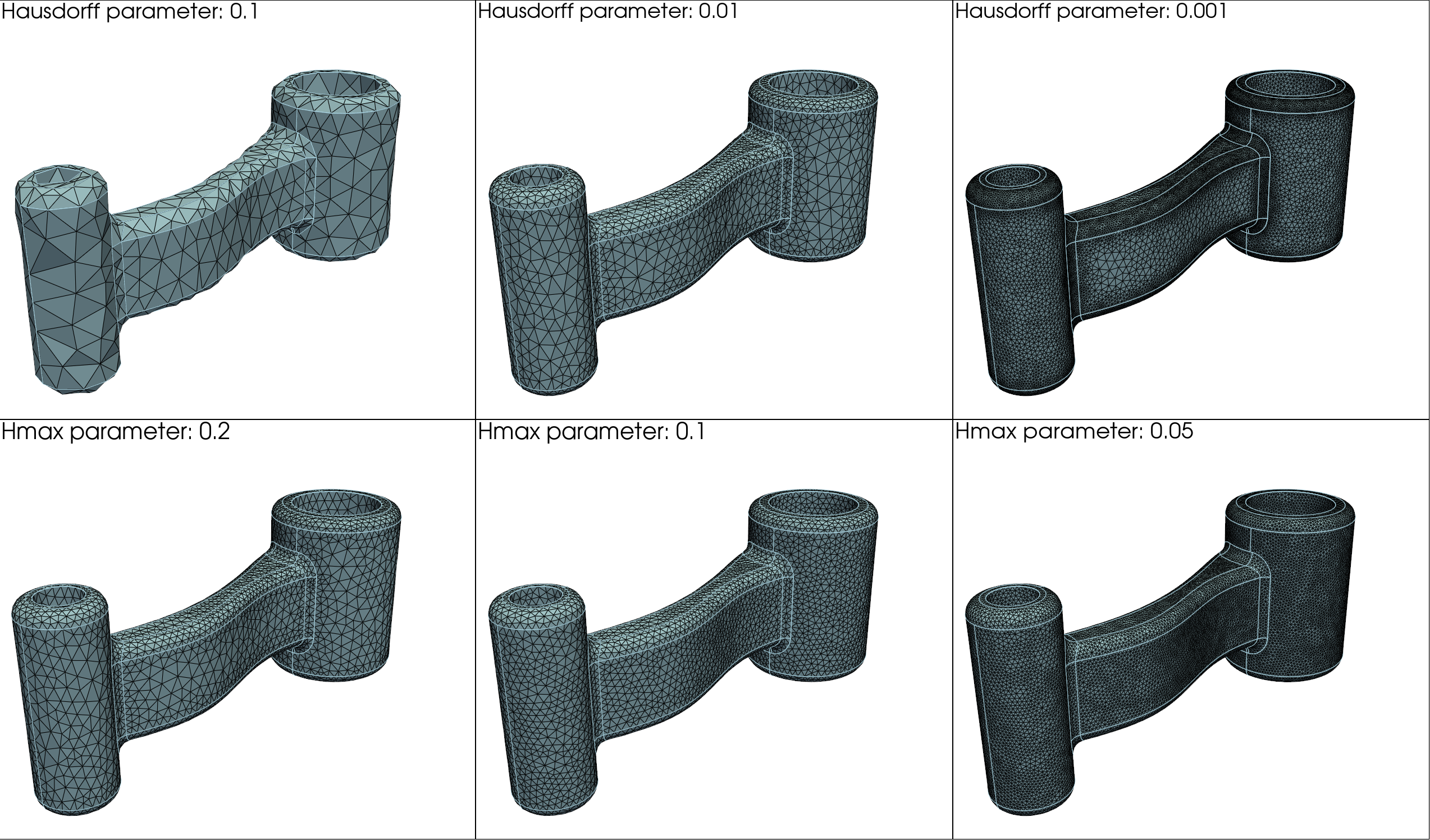
Industrial part surface remeshing.
"""Mechanical part surface optimization."""
import pyvista as pv
import mmgpy  # noqa: F401

mesh = pv.read("part.stl")

remeshed = mesh.mmg.remesh(
    hmax=0.05,
    hausd=0.001,
    ar=30,     # Preserve sharp edges
)
Smooth Surface Remeshing
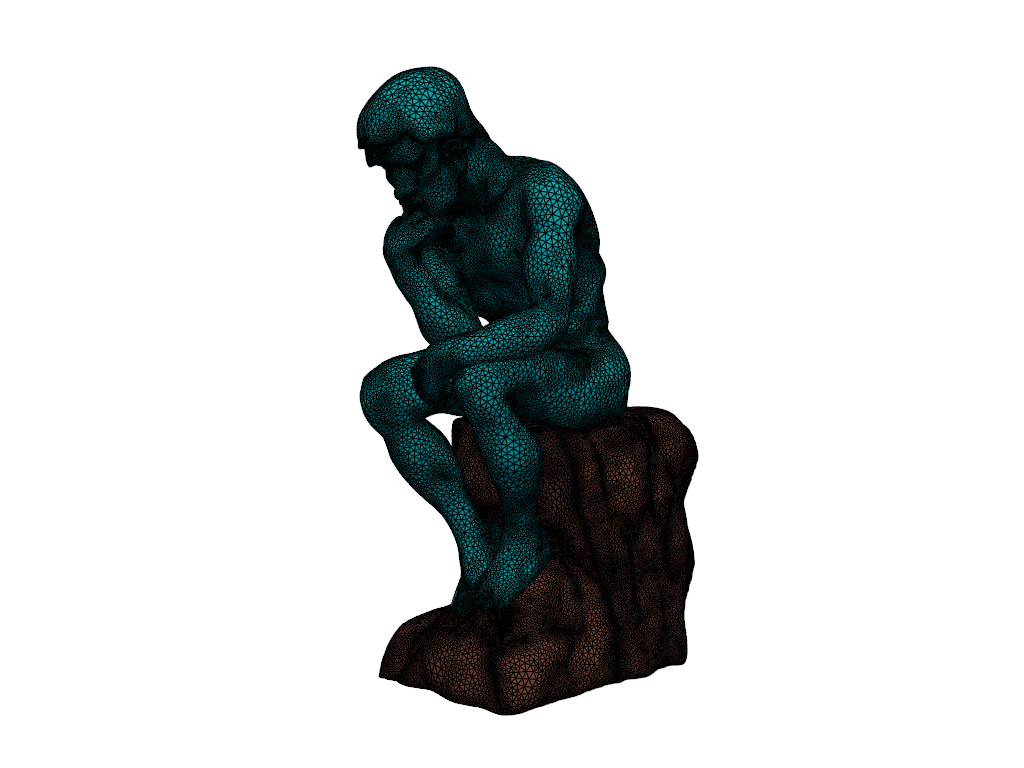
Surface smoothing and refinement.
"""Smooth surface mesh optimization."""
import pyvista as pv
from mmgpy import MmgSOptions

mesh = pv.read("surface.mesh")

options = MmgSOptions(
    detect_ridges=False,
    hmax=0.1,
    hausd=0.0001,
    hgrad=1.1,
)
remeshed = mesh.mmg.remesh(options)
Implicit Surface Meshing
Generate a surface from an implicit function.
"""Generate surface mesh from implicit function."""
import numpy as np
import pyvista as pv
import mmgpy  # noqa: F401

mesh = pv.read("background_surface.mesh")
vertices = np.asarray(mesh.points)

R, r = 0.5, 0.15
x, y, z = vertices[:, 0] - 0.5, vertices[:, 1] - 0.5, vertices[:, 2] - 0.5
q = np.sqrt(x**2 + y**2) - R
levelset = (np.sqrt(q**2 + z**2) - r).reshape(-1, 1)

discretized = mesh.mmg.remesh_levelset(levelset)
Running Examples
Clone the repository and run examples:
git clone https://github.com/kmarchais/mmgpy.git
cd mmgpy

# Install with examples dependencies
pip install -e ".[dev]"

# Run an example
python examples/mmgs/mechanical_piece_remeshing.py
Each example includes detailed comments and visualization using PyVista.